
How Anchor Links Can Turn a Long Email Into a Better Reader Experience
- The Newsletter Is Not the Destination
- What Exactly Is an Anchor Link?
- Why This Matters More Than Ever
- The Hidden SEO Advantage
- How to Create Anchor Links in WordPress
- Think Like a Publisher, Not Just an Email Sender
Most newsletters are trying to do too much. An author, a nonprofit, small business, or community organization sits down to create a monthly email and suddenly realizes they have:
- upcoming events
- announcements
- blog posts
- videos
- podcasts
- workshops
- photos
- community updates
- social media highlights
The temptation is obvious. Just paste everything into an email. The newsletter grows longer and longer until it becomes a giant digital scroll that feels less like communication and more like homework. Readers open it with good intentions. Then they skim. Then they stop and tap delete. Especially on mobile devices.
The problem usually isn’t the quality of the content. It’s the structure. There’s a smarter way to handle large amounts of information online, and it involves something surprisingly simple: anchor links.
The Newsletter Is Not the Destination
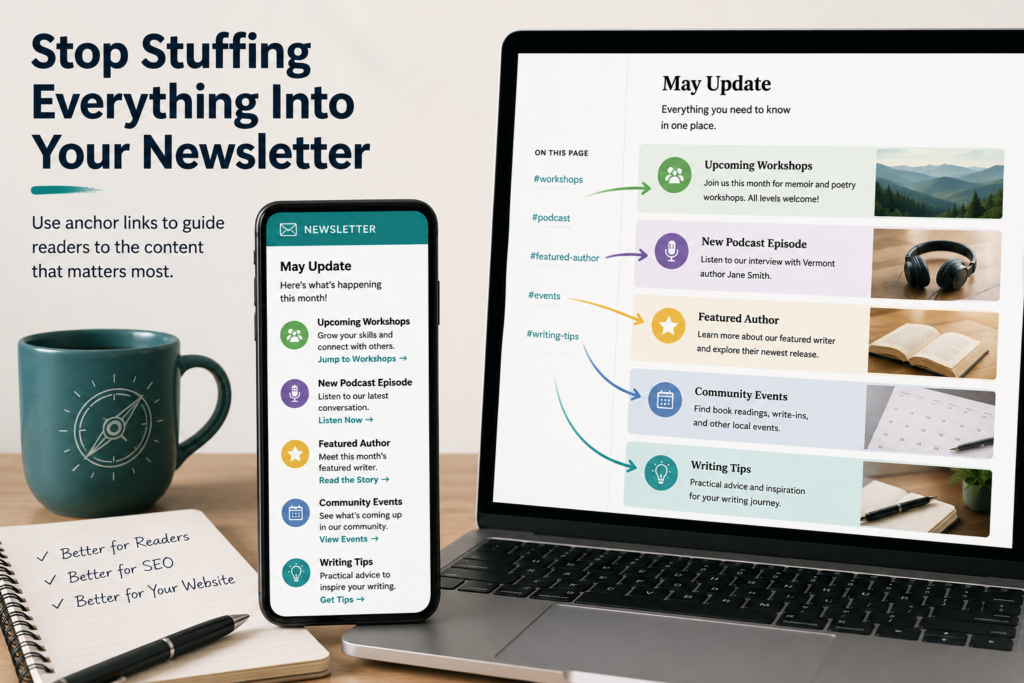
One of the biggest mindset shifts in digital publishing is understanding that the newsletter itself does not need to contain all the information. Instead, the newsletter can act as a guide. Think of it as a table of contents pointing readers toward a well-organized post on your website. Rather than stuffing an entire article, event listing, and media archive into an email, you create:
- one strong webpage post
- clear section headers
- anchor links to each section
Then your newsletter simply introduces each topic with a sentence or two and provides a direct jump link. The result feels dramatically cleaner and more professional. Instead of overwhelming readers, you help them navigate.
What Exactly Is an Anchor Link?
An anchor link is a special kind of URL that jumps directly to a specific section of a webpage. For example, instead of sending readers only to:
yourwebsite.com/monthly-updateyou can send them directly to:
yourwebsite.com/monthly-update/#workshopsor:
yourwebsite.com/monthly-update/#podcastor:
yourwebsite.com/monthly-update/#featured-authorWhen the reader clicks the link, the webpage automatically scrolls to that exact section. No hunting. No endless scrolling. No frustration. It’s a small detail that dramatically improves usability.
Why This Matters More Than Ever
Modern audiences skim. That’s not necessarily because people are lazy. It’s because everyone is overloaded with information and if you check your statistics, it’s likely that more than half of your readers are looking at your newsletter on their phone. Most readers quickly ask themselves:
- What’s relevant to me?
- What should I pay attention to?
- Where do I click?
A massive newsletter filled with uninterrupted content makes those decisions harder. Anchor-based publishing solves that problem by creating structure. Readers can instantly jump to:
- the workshop section
- the event calendar
- the featured article
- the newest podcast
- the photo gallery
- the donation page
Instead of forcing everyone through the same linear experience, you allow self-navigation. That creates a much more respectful relationship with the audience.
The Hidden SEO Advantage
This strategy also quietly improves search engine optimization. When all your content lives inside an email, search engines can’t properly index it. But when the content exists on your website:
- Google can crawl it
- AI search systems can reference it
- visitors spend more time on your domain
- internal links become more valuable
- individual sections become searchable
Your website becomes the permanent home of your content rather than an email platform that is typically deleted after reading. This matters. Especially now that AI-driven search engines increasingly summarize and reference structured web content instead of simply ranking pages by keywords. Clear headers and organized sections help both humans and machines understand your material.
Why This Works So Well for any Diverse Organization
Let’s consider a group like the Green Mountain Writers. This approach would be especially useful because they generate many different kinds of newa updates simultaneously.
A newsletter might have:
- a memoir workshop
- a poetry event
- a featured author story
- a YouTube interview
- a podcast episode
- member announcements
- upcoming classes
Trying to fully publish all of that inside a single episode of a newsletter quickly becomes chaotic. But a well-structured post on the website can comfortably hold all of it. Then the email becomes lighter, warmer, and an easier-to-read summary with links. Something that becomes:
- Simple.
- Elegant.
- Easy to scan.
How to Create Anchor Links in WordPress
The good news is that modern WordPress themes make this extremely easy. Themes like Blocksy work beautifully with Gutenberg heading anchors. Inside WordPress:
- Add a heading block
- Select the heading
- Open the block settings sidebar
- Expand the “Advanced” drop down.
- Add an HTML Anchor
For example:
featured-authorNow that section can be linked directly using:
https://yourwebsite.com/monthly-update/#featured-authorNo plugin required. Just clean structure.
Think Like a Publisher, Not Just an Email Sender
The deeper lesson here is about an online publishing philosophy. A newsletter should not try to become an entire website squeezed into an inbox. The email’s purpose is to direct focus to the hub, aka your website. Invoke curiosity and provide redirection. The website holds the knowledge. The newsletter provides the invitation.
Once you begin thinking this way, communication becomes easier to organize and far more enjoyable to read. And perhaps most importantly, readers stop feeling trapped inside endless scrolling walls of text. Instead, they feel guided through a thoughtfully designed experience. That difference matters.

Stephen Kastner is the founder of DesignWise Studios and Green Mountain Writers. His work spans storytelling, digital publishing, documentary filmmaking, photography, AI visibility strategy, and human-centered marketing. Beginning as a newspaper photojournalist in the 1980s and later building websites and online learning systems during the early internet era, he writes frequently about authenticity, media, communication, publishing, and the evolving relationship between technology and human identity.